PCB CNC-Plotter
緣起
因為洗電路板很麻煩,曬電路板又很容易失敗,原本是想 DIY 一台 PCB CNC 來協助製作電路板,但是 CNC PCB 的速度太慢了,但是看到 Dirk Herrendoerfer 先生製作的 PCB CNC-Plotter 計畫,驚為天人,所以想要開始製作這個工具。
Source
https://github.com/dherrendoerfer/uCNC_controller/tree/master/Extras
紀錄
影片
*
http://www.youtube.com/watch?v=P0nTmpGKBTo&list=PLotvT33qzzfLRwgobtJN5hoL4Ef7nsFFY&index=6
簡介
uCNC_controller 是一個 g-code 解碼控制器的應用程式,它是用於 Arduino 的平台上。它解碼 g-code的命令並且從而去控制 unipolar 步進馬達(3)、一些數位輸出(2)、伺服馬達(1)。
照片
列印過程
列印過程:
使用 eagle 畫好電路板
點選 cam job ,在 output 的 device 中,選擇 HPGL。在 pen 的 diameter 中,輸入0.4mm。
儲存
軟體
在 Arduino nano w. ATMEGA328P 上的腳位設定
------------>--------------------------------------------
- Stepper 1: 8,9,10,11
- Stepper 2: 4,5,6,7
- Stepper 3: A5,A4,A3,A2 (digital out 19,18,17,16)
- 12V out 1: 2
- 12V out 2: 3
- Laser out: 13
- Servo out: 12
- Unused : A0,A1,A6,A7 (A6 and A7 cannot be used as output)
硬體
材料:
- step motor: 28YBJ-48(pt3影片 8:24)
- Driver IC: ULN2004A 6-15V(從影片10:51提到)
- ULN2003A 5V
- Arduino nano
- 電容、78xx IC(可能是7805 for step motor)
- 電路板(8:01)
- 5mm 光軸
- 6*5 mm 銅管
- staedtler 0.4 mm 油性筆
- nylon string rated at >50N
- 伺服馬達(數位式)
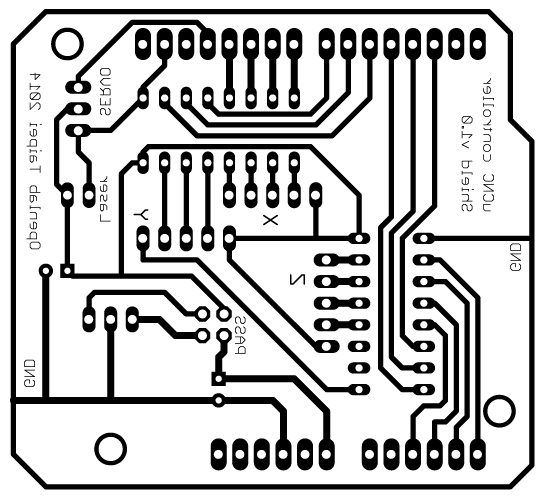
You need 2x ULN2003 or 2004, one 7805 regulator, two capacitors. The power regulator goes into the upper left. If you want to use the laser you also need a mosfet and a resistor. If someone is a master at eagle I would really love to have a component layer for the .brd?
零件清單:
*
uCNC controller 電路板(UNO版)阿助設計。 PS: 還沒洗出來測試
文件
裝置特定的 g code 命令
&0:calibratePattern
&1: slackPattern
&2:slackPattern2
&99:輸出硬體設定
M150:設定 Z 軸模式
g code 使用資料
模式
定義模式,透過可以寫程修改狀態的控制器,來如何使用步進馬達、伺服馬達和雷射驅動。
模式0:步進馬達 1 是 X 軸
步進馬達 2 是 Y 軸
步進馬達 3 是 Z 軸
伺服馬達是主軸轉速
雷射是由主軸驅動
模式1:步進馬達 1 是 X 軸
步進馬達 2 是 Y 軸
步進馬達 3 是 Y 軸
伺服馬達是 Z 軸 (down for Z<0)
雷射是 Z 軸 (on for Z<0)
模式2:步進馬達 1 是 X 軸
步進馬達 2 是 Y 軸
步進馬達 3 是 Y 軸
伺服馬達是 Z 軸 (+90 to -90)
雷射是由主軸驅動
模式3:步進馬達 1 是 X 軸
步進馬達 2 是 Y 軸
步進馬達 3 是 Y 軸
伺服馬達是工具
雷射是 Z 軸 (on for Z<0)
範例:
M150 S2 ;設定為模式 2
繪製電路圖使用流程
- 使用 eagle 設計電路圖。
- 選擇 file > cam processor ,把 device 選項為 hpgl ,diameter 為 0.4,匯出檔案。
- 使用Hp2xx ,轉成 nc gcode。
- 打開 ardGcodeWriter.py。
- 讀入檔案。
- 列印。
另一種獲得 nc g code 的方法,建立一個 Gerber 檔案,然後使用 gerber2gcode 得到。
hp2xx -m nc -t <input file>
NOTE: hp2xx must be compiled with nc support.?
硬體安裝
尼龍線與馬達
The nylon is wound around the steppers 3 times - that is ok for the needed friction to move, but if you run into the ends, it won't damage anything. If the stepper rod is too smooth you can apply a thin layer of plasticote or thin glue and let that dry completely. A touch up with a file or metal brush would also do the trick.?
檔案結構
- uCNC_controller:主程式
- nCNC_builtin:
- uCNC_gcode:
- 資訊經過轉換後
- uCNC_motor:
- 馬達輸出的處理
- uCNC_prase:解析
- uCNC_stepper:步進
- uCNC.h:
問題
- 雖然有找到程式碼、電路板圖與3D檔案,但是不知道要用到哪些電子零件。
- 3D 檔案有破面,列印出來的物件很薄,有點怪怪的。
- 使用哪種油性筆?(雄獅奇異筆,筆劃 1mm ,筆桿上圓直徑 11.3mm,下圓直徑10.8mm)
- 步進馬達只會同一方向旋轉。
- 可以送 g-code 去控制 x, y 馬達移動,但是抓不到要領去控制 Z 軸的伺服馬達
- 輸入&0, &1 命令,只回得到 ok,沒有其他訊息。
改進
- 魚線專用絞盤 (3D 列印出來後比對,不適合使用),原本的設計是直接把魚線繞在步進馬達的轉軸上,但是覺得應該有更好的方式安裝與運作,所以增加這部份。
- 改成皮帶帶動的方式?
- 筆桿機構部份改進,因為在台灣容易買到的油性筆與原作者所使用的不同,所以必須改變設計。
- 筆得加上彈簧頂住,下筆的時候就可以下超過行程,彈簧也會起緩衝作用,遇上 pcb 不平也能安穩抵住,pcb 就不用像雕刻那樣要用雙面膠從背部固定,只需要在外側用膠帶貼一下即可。(鉛筆壹)
- 加上可讀記憶卡的 lcd 控制器,來離線列印電路板,不用在列印的過程中一直電腦連線。
- 遠端送墨或是像鋼筆用的卡式墨匣。
- 可換式筆尖:印久了筆尖會開花,以前筆式繪圖機的筆好像有陶瓷筆尖,印久了比較不會開花,或是下筆控制程式有加減速功能。
3d 列印零件改進

http://www.thingiverse.com/thing:725706

http://www.thingiverse.com/thing:950749

http://www.thingiverse.com/thing:18678
Enlarged Rostock Carriage V1.2 for 12mm smooth rod
檢討-2014-9-10
參考資料
夾筆的機構
http://www.thingiverse.com/thing:24435
http://www.thingiverse.com/thing:5288
http://www.thingiverse.com/thing:3593
http://www.thingiverse.com/thing:47696
http://www.thingiverse.com/thing:10992 (彈簧)
http://www.thingiverse.com/thing:47696
http://www.thingiverse.com/thing:31983
http://www.thingiverse.com/thing:230152 (使用教學)
http://reprap.org/wiki/Plotting
結構
http://www.thingiverse.com/thing:182675
http://www.thingiverse.com/thing:30961
https://256.makerslocal.org/wiki/index.php/Makers_mantis_cnc
http://www.thingiverse.com/thing:6115
http://www.thingiverse.com/thing:344996
http://www.thingiverse.com/thing:945156
http://www.thingiverse.com/thing:18678
相似計畫
http://junkplusarduino.blogspot.tw/p/svg-image-plotter.html
http://www.instructables.com/id/X-Y-Plotter-1/
軟體
https://docs.google.com/file/d/0B1DQmCDF0I3kcUxraTJITWpPV0E/edit
硬體